
Binance Pro vs Binance Lite: What’s the Difference?
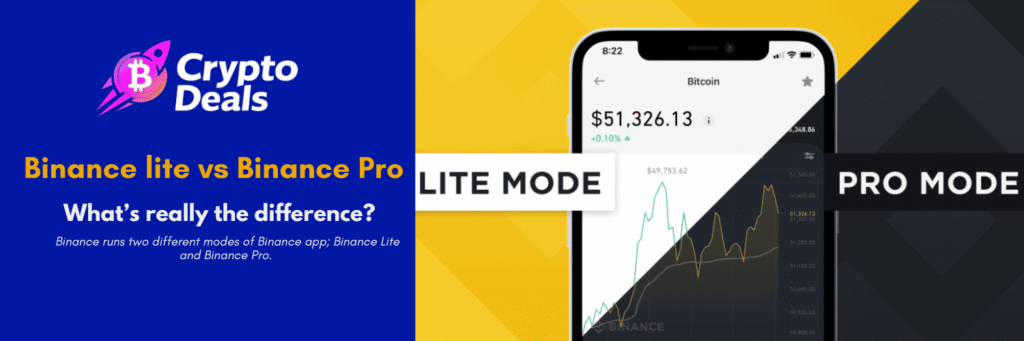
If you’ve once opened Binance app and it looked way different from what a youtube video or a friend’s app displayed; well be rest assured you’re not imagining things. Binance in the actual sense of it runs two different modes of Binance app; Binance Lite and Binance Pro. They all have a very different look and feel and are meant to serve different types of users.
So which one is right for you? In this detailed guide we’ll go through the key difference between these two Binance modes, help you determine which one suits you, share pro tips that will ultimately save you time, money and even headaches; despite whether you’re a complete newbies or experienced trader.
What Is Binance Lite?
Binance Lite came to fruition in February 2021 and was specifically designed for investors and HODLers looking to simplify the crypto exchange process, therefore making it easily accessible to users who might find complex order books and charts to be quite intimidating.
Think of it as the “easy mode” of Binance. Binance created the Lite mode to promote speed, simplicity, and ease of use for new users trading cryptocurrencies. It simplifies everything from the main Binance app and only presents features essential for trading crypto.
Binance Lite is the default mode you’ll see when you initially download the Binance app. This version is designed to have high usability for all users, regardless of their experience in the crypto industry.
In Lite mode, you can:
- Check live cryptocurrency prices
- Buy and sell crypto quickly
- Convert one crypto to another
- Do basic staking in the wallet section
What you can’t do includes things like placing limit orders, accessing futures markets, or using advanced charting tools. More on that below.
What Is Binance Pro?
Pro mode is the full cockpit: advanced charts, a wider order type menu, and access to Spot, Margin, Futures, Options, plus P2P. It’s built for users who want order books, depth tools, and customization rather than a simplified flow.
Binance Professional is designed for more advanced crypto users or those who want to make use of the app’s additional features. Its interface is still pretty user-friendly but isn’t as simple as that of Binance Lite.
In Pro mode, you get access to everything Binance has to offer; including tools that serious traders rely on every single day.
How to open a Binance account>>
Key Differences: Binance Lite vs Binance Pro
1. Interface and Design
The interface itself is the first difference that is instantly noticeable. Lite mode has a simpler overview of basic options; reviewing the prices of cryptocurrencies, buying and selling them, as well as converting them. The charts are also simplified.
Pro mode, by contrast, gives you a full trading terminal feel. You’ll see candlestick charts, order books, real-time depth data, and multiple customizable panels. It looks complex at first, but once you get used to it, it’s incredibly powerful.
2. Order Types
This is one of the biggest practical differences. In Binance Lite, you’re basically limited to simple market buys and sells. In Binance Pro, the platform supports market orders, limit orders, and stop-limit orders, allowing you to execute trades according to your specific price targets or market conditions. It also supports OCO (One-Cancels-the-Other) orders, which allow you to place two orders simultaneously; when one executes, the other is automatically canceled.
3. Earn Features
Binance Lite does have an Earn section, but the features are extremely limited, given that this mode isn’t made for advanced functions. It’s best to head over to Binance Professional if you want to make the most of the Earn section. Binance Professional also offers a Futures section.
With Pro, you can access full staking options, flexible savings, liquidity farming, and yield products; all of which can be meaningful income streams if you’re holding crypto long term.
4. Futures and Margin Trading
This is exclusively a Binance Pro territory. Binance Futures is the most liquid and widely-used cryptocurrency derivatives platform, offering up to 125x leverage on certain pairs. None of this is available in Lite mode; and honestly, that’s by design. These products carry serious risk and are not appropriate for beginners.
5. P2P Trading
Peer-to-peer trading; where you buy crypto directly from other users, is only available in Pro mode. This can be useful if you want to pay with local payment methods or get better rates on certain currencies.
6. Charting and Technical Analysis
Users of the Pro version get technical charts and indicators powered by TradingView integration. You can draw trendlines, apply RSI, MACD, Bollinger Bands, and dozens of other indicators. Lite mode shows you basic price movement; nothing more.
7. Who It’s Designed For
| Feature | Binance Lite | Binance Pro |
| Target User | Beginners / HODLers | Active traders / Power users |
| Interface | Simple, minimal | Advanced, data-rich |
| Order Types | Market orders only | Limit, Stop-Limit, OCO, and more |
| Futures/Margin | Not available | Available |
| Full Earn Section | Limited | Full access |
| P2P Trading | Not available | Available |
| Technical Charts | Basic | Full TradingView integration |
| Auto-Invest / Bots | Not available | Available |
| Default for New Users | Yes | Switch manually |
Andrzej Wiśniewski Quick Tip

Andrzej Wiśniewski is a Kraków-based crypto trader and on-chain analyst who’s been active in the space since the 2017 bull cycle.
“Start on Lite, but don’t stay there too long.” If you’re new to crypto, Lite mode is a great place to get comfortable. Buy your first Bitcoin, learn how transactions work, and get a feel for price movements. But once you’ve been around for 2–3 months, switch to Pro; even if you don’t use all the features right away. Just having access to proper limit orders alone can save you from buying at the worst possible moment during a volatile pump or dump.
How to Switch Between Binance Lite and Pro
Switching is incredibly simple; it takes literally one tap. Switching is instant; just open the account center and choose Binance Pro.
Here’s how to do it on mobile:
- Open the Binance app
- Tap your profile icon in the top left
- Scroll down to find “Switch to Pro” (or “Switch to Lite” if you’re already in Pro)
- Tap it & done
You don’t lose any funds, settings, or account history when you switch. It’s just a different view of the same account.
Which One Should You Use?
Here’s the honest answer: it depends on what you’re doing with crypto.
Use Binance Lite if:
- You’re brand new to crypto
- You just want to buy Bitcoin or Ethereum and hold it
- You find charts and order books overwhelming
- You only trade occasionally and don’t need advanced tools
Use Binance Pro if:
- You actively trade and care about getting good entry prices
- You want to earn passive income through staking, savings, or liquidity pools
- You’re interested in futures or margin trading (with proper risk management)
- You want to use P2P or auto-invest features
- You’re serious about technical analysis
The good news? You can switch back and forth anytime. Many users keep Pro as their default but will occasionally switch back to Lite for a faster, cleaner buy experience when they don’t need all the bells and whistles.
Here’s something most guides won’t tell you. When you buy crypto on Binance Lite using the simple “Buy” button, you’re often transacting at a slightly wider spread than what you’d get in Pro mode using a limit order. Over time, if you’re buying regularly, those small differences add up. A savvy user sets a limit order just 0.1–0.3% below the current market price on Pro mode. Most of the time, during normal market conditions, that order fills within minutes; and you’ve shaved off a bit of cost every single time. It’s a small habit that compounds into real savings.
Andrzej Wiśniewski Quick Tip
Andrzej Wiśniewski is a Kraków-based crypto trader and on-chain analyst who’s been active in the space since the 2017 bull cycle.
“Use Lite for buying, Pro for managing.” Here’s a workflow used by many intermediate crypto holders: use Lite for quick, stress-free buys (especially during DCA; dollar cost averaging) and then switch to Pro to manage your portfolio, check your earnings, set stop-losses, or review your positions. This way you get the simplicity of Lite for execution and the power of Pro for strategy. Best of both worlds.
More Tips for Crypto Users on Binance
- Enable 2FA immediately. Whether you’re on Lite or Pro, secure your account with Google Authenticator or a hardware key. SMS-based 2FA is better than nothing, but app-based is safer.
- Use BNB to pay fees. Binance offers a discount when you pay trading fees with BNB (Binance Coin). This applies in both Lite and Pro modes. If you’re actively trading, this is a no-brainer.
- Don’t sleep on the Earn section in Pro. Even if you’re not a trader, just holding stablecoins in Binance’s flexible savings can earn you passive yield. It’s far better than letting your USDT sit idle.
- Set price alerts. In Pro mode, you can set notifications for when a coin hits a specific price. This is more useful than constantly checking your phone.
- Understand liquidation before touching leverage. If you ever venture into futures on Pro mode, know your liquidation price before entering any position. Anything above 5x leverage is not advisable, and even that seriously increases the risk of capital loss. Never invest more than what you’re comfortable losing.
Frequently Asked Questions (FAQs)
Is Binance Lite free to use?
Yes. Both Lite and Pro are free modes within the same app. You pay the same standard trading fees regardless of which mode you’re in; the mode itself doesn’t affect fee structure.
Can I lose my crypto by switching modes?
No. Switching between Lite and Pro is purely a display/interface change. Your funds, account history, and settings remain completely untouched.
Is Binance Pro suitable for beginners?
It can be, with some patience. The interface has more information on screen, but Binance has done a decent job of making it navigable. If you’re willing to spend 30 minutes exploring it, most beginners find their footing reasonably quickly.
Does Binance Lite support all cryptocurrencies?
Not all of them. Lite mode supports a curated selection of the most popular coins. For more obscure altcoins, you’ll need Pro mode, which gives access to the full range of Binance’s 600+ listed cryptocurrencies.
Which mode is better for long-term investors?
Lite mode is perfectly fine for pure HODLers who just want to buy and forget. However, if you want to maximize your holdings through staking and earning features, Pro mode is the better choice even for long-term investors.
Can I use Binance Pro on a desktop?
Yes. The full Pro experience is available both on the Binance mobile app and on the Binance web platform at binance.com. The desktop web version is actually even more feature-rich than the mobile Pro mode.
What happens to my pending orders if I switch modes?
Any open orders you’ve placed in Pro mode will continue to be processed normally, even if you switch to Lite. The switch only affects what you see; not what’s happening under the hood.
Conclusion
Binance Lite and Binance Pro are two tools for two different stages of your crypto journey. Lite removes the complexity so you can get started without feeling overwhelmed. Pro hands you the full toolkit when you’re ready to go deeper.
The smart approach: Start on Lite, get comfortable, and graduate to Pro when you’re ready to take your crypto game to the next level. Binance makes switching effortless, so there’s no risk in exploring.
At CryptoDealsHub.com, we always say: the best crypto platform is the one you actually understand. Master the basics first, and the advanced tools will start to make sense on their own.
Kraków-based trader active in crypto markets since the 2017 bull cycle. Andrzej specialises in on-chain analysis, exchange mechanics, and risk management. I help everyday crypto traders navigate the crypto space with confidence in order to make informed decisions.
Disclaimer: This article is for informational purposes only and does not constitute financial or investment advice. Cryptocurrency trading involves significant risk. Always do your own research before making any investment decisions.